
VPN and eSIM in China: How to Actually Use Google, Instagram and ChatGPT
The night before flying to China, most travelers run the same Google search: "which VPN actually works in China". What follows is an afternoon lost between conflicting reviews, subscriptions activated in a hurry, and the well-founded doubt that the chosen app will stop working exactly on the days it's needed most. It's a real and well-documented problem: Mainland China filters access to Google, Instagram, WhatsApp, YouTube and services like ChatGPT through the so-called Great Firewall, and many eSIMs marketed for China include no integrated solution, leaving users to configure a VPN on their own behind a firewall that is specifically designed to make them unreliable.
With the BLIVALE China Unlimited eSIM the problem doesn't even arise, because no VPN is required for it to work: "No VPN is required to use the eSIM, and there are no software restrictions on our eSIM." In this guide we explain why this is technically the case, what you can actually do with Google, Instagram and ChatGPT from the very first minute, and we back it up by showing 22 days of real data usage from a customer traveling in China, exported directly from the traffic management panel.
Do you need a VPN to use Google and Instagram in China with the BLIVALE eSIM? No. The China Unlimited eSIM routes data traffic over the carrier's international network, outside the Great Firewall filter: Google, Gmail, Instagram, WhatsApp and most Western services remain reachable without installing or configuring any third-party app. The plan starts as soon as you install the QR code, and in the real log of a customer's trip, over 37 GB moved in 22 days with no interruptions or slowdowns on the China Mobile network.
The tourist who just wants Google Maps and Instagram
You don't care about the technical side: you want to find your way with Maps, send trip photos and stay in touch with people back home, without spending your first evening configuring an app that might stop working the next day.
The business traveler with Gmail, Drive and ChatGPT
Trade fairs, meetings, factories: you need Gmail, Google Drive, video calls and work tools like ChatGPT always reachable, without the risk of a corporate VPN getting blocked right in the middle of an important call.
Anyone who's already tried a VPN in China and got burned
You've already dealt with a VPN that disconnects on its own, a slow server, or a subscription paid for nothing because the Great Firewall spotted it. You want a solution that works by design, not by luck.
China Unlimited eSIM: Google, Instagram and ChatGPT without a VPN
Truly unlimited data on the China Mobile network. No VPN to install. Activation via QR code.
🧱 The Great Firewall and the real VPN pain point
Mainland China has for years applied an internet traffic filtering system known as the Great Firewall, which makes services like Google (Search, Gmail, Maps, Drive), Instagram, Facebook, WhatsApp, YouTube and, on the AI-tools side, ChatGPT and other OpenAI services generally unreachable — on domestic Chinese networks, including local SIMs and the Wi-Fi in many hotels. For years, the "default" answer has been just one: install a VPN before you leave.
The problem is that a VPN in China isn't a switch you flip on and leave on. The Great Firewall actively analyzes traffic looking for patterns typical of VPN protocols and slows or blocks them, with an intensity that varies over time and tends to tighten around political or institutional events. The practical result, reported consistently by people who travel or work in China, is a very concrete set of problems: servers that disconnect on their own during peak hours, speeds that collapse right when a video call is loading, subscriptions bought at the last minute that stop working after a few days, apps that need to be installed before crossing the firewall because many Chinese app stores no longer distribute them once you've arrived.
Many eSIMs sold for China don't include any integrated VPN: buyers only discover on the ground that they need to configure one themselves, behind a firewall built specifically to make VPNs unreliable. This isn't a minor technical detail: it's often the reason a trip that was supposed to be "connected" ends up with hours spent offline or chasing a server that actually works.
This is exactly the gap this guide aims to close, as a practical complement to our general guide on the China Unlimited eSIM: not yet another list of VPNs to try, but an explanation of a different mechanism that avoids the problem at its root.
🔀 How it works: roaming eSIM vs a Chinese VPN
A Chinese local SIM — physical or eSIM — relies on the carrier's domestic network in China, the same network the Great Firewall acts on. To reach Google or Instagram from that network you necessarily need an encrypted tunnel that hides the traffic, i.e. a VPN, with all the limitations described above.
The BLIVALE China Unlimited eSIM works differently: your phone does connect to the local China Mobile (CMCC) network for the radio signal, but data traffic is routed over international roaming to the infrastructure of the carrier providing the service, exactly as a SIM from your home operator would do while roaming. In other words, the traffic leaves China's domestic network before reaching Google or Instagram, and for that reason it doesn't run into the filters applied to that network. It isn't a software trick, it isn't a VPN disguised as an eSIM: it's a structural difference in routing, explicitly stated by the eSIM's manufacturer: "No VPN is required to use the eSIM, and there are no software restrictions on our eSIM."
📱 Google, Instagram, ChatGPT: what you can do from minute one
In practice, with the BLIVALE eSIM active and data roaming enabled, from the moment you land you can:
- Use Google Search, Gmail, Google Maps and Google Drive to find your way, work and communicate, with no difference from being at home;
- Open Instagram, Facebook and WhatsApp to share photos, stories and messages with the people following you or waiting for you;
- Watch YouTube and other Western streaming services;
- Use the ChatGPT app or website and other OpenAI tools for work or study, under the same network conditions you'd have outside China.
The BLIVALE eSIM solves the network reachability problem: with our roaming routing, the ChatGPT website and app respond normally, without the Great Firewall filter. What's a separate matter is the account: OpenAI, during sign-up, in some cases requires a phone number for verification, and not all Chinese prepaid plans are accepted for this purpose. If you already have an active account set up with a non-Chinese number, connecting through our eSIM works without issues; if you need to create a new one, we recommend doing it before you leave, with your usual number.
The central, verifiable and non-promotional point is this: with the BLIVALE eSIM you aren't "bypassing" anything every time you open an app. The traffic simply follows a network path that doesn't pass through the filters applied to China's domestic network, so the experience is that of a normal data connection, not the unstable, stuttering experience typical of a VPN under pressure.
📊 Real data: 22 days of usage in China
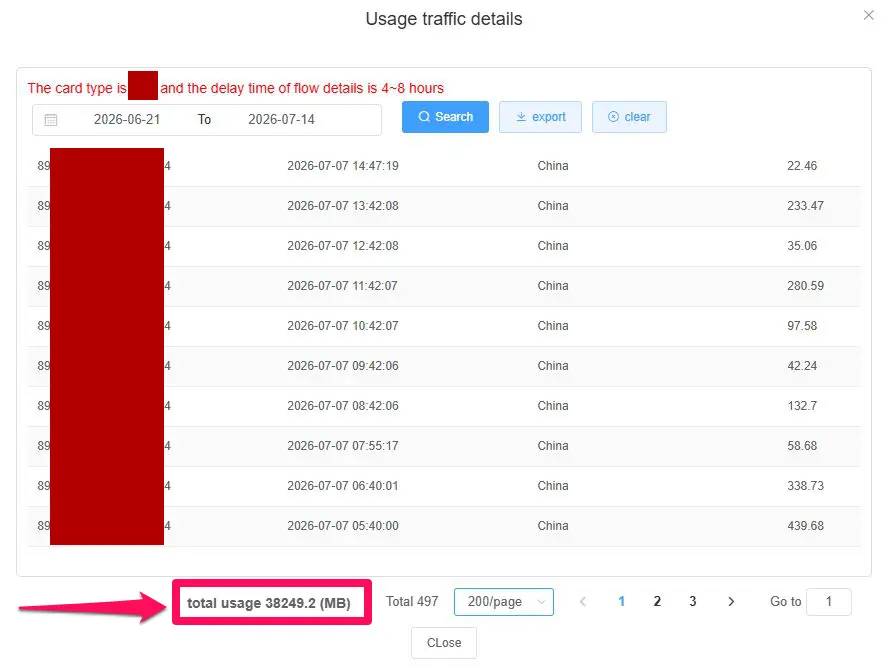
Claims take a second to write; traffic logs don't. Below is the export from the traffic management panel of a BLIVALE China Unlimited eSIM actually active on the China Mobile (CMCC) network from June 21 to July 12, 2026 (ICCID: 89*****************4), the same period already referenced in our general China eSIM guide, read here line by line to show what "no software restrictions" actually means in practice when hundreds of megabytes flow every day to Google, social apps and work tools.
Detailed daily usage
| Date | MB used | GB | Readings | Intensity |
|---|---|---|---|---|
| 🗓️ Sun, June 21, 2026 | 971.45 MB | 0.95 GB | 16 | Low |
| 🗓️ Mon, June 22, 2026 | 1,510.67 MB | 1.48 GB | 24 | Moderate |
| 🗓️ Tue, June 23, 2026 | 1,893.05 MB | 1.85 GB | 24 | High |
| 🗓️ Wed, June 24, 2026 | 1,446.26 MB | 1.41 GB | 24 | Moderate |
| 🗓️ Thu, June 25, 2026 | 2,568.53 MB | 2.51 GB | 24 | Peak |
| 🗓️ Fri, June 26, 2026 | 1,386.32 MB | 1.35 GB | 24 | Moderate |
| 🗓️ Sat, June 27, 2026 | 1,387.06 MB | 1.35 GB | 22 | Moderate |
| 🗓️ Sun, June 28, 2026 | 1,135.12 MB | 1.11 GB | 24 | Moderate |
| 🗓️ Mon, June 29, 2026 | 1,569.33 MB | 1.53 GB | 20 | Moderate |
| 🗓️ Tue, June 30, 2026 | 981.08 MB | 0.96 GB | 24 | Low |
| 🗓️ Wed, July 1, 2026 | 2,231.15 MB | 2.18 GB | 24 | High |
| 🗓️ Thu, July 2, 2026 | 753.37 MB | 0.74 GB | 24 | Low |
| 🗓️ Fri, July 3, 2026 | 2,343.99 MB | 2.29 GB | 24 | Peak |
| 🗓️ Sat, July 4, 2026 | 3,030.09 MB | 2.96 GB | 22 | Peak |
| 🗓️ Sun, July 5, 2026 | 1,118.03 MB | 1.09 GB | 24 | Moderate |
| 🗓️ Mon, July 6, 2026 | 1,433.77 MB | 1.40 GB | 22 | Moderate |
| 🗓️ Tue, July 7, 2026 | 2,035.32 MB | 1.99 GB | 24 | High |
| 🗓️ Wed, July 8, 2026 | 1,529.34 MB | 1.49 GB | 24 | Moderate |
| 🗓️ Thu, July 9, 2026 | 2,905.11 MB | 2.84 GB | 24 | Peak |
| 🗓️ Fri, July 10, 2026 | 2,523.09 MB | 2.46 GB | 24 | Peak |
| 🗓️ Sat, July 11, 2026 | 2,626.15 MB | 2.56 GB | 24 | Peak |
| 🗓️ Sun, July 12, 2026 (partial) | 868.39 MB | 0.85 GB | 11 | Low |
| ✅ TOTAL (22 days) | 38,246.67 MB | ≈ 37.35 GB | 497 | avg ≈ 1.70 GB per day |
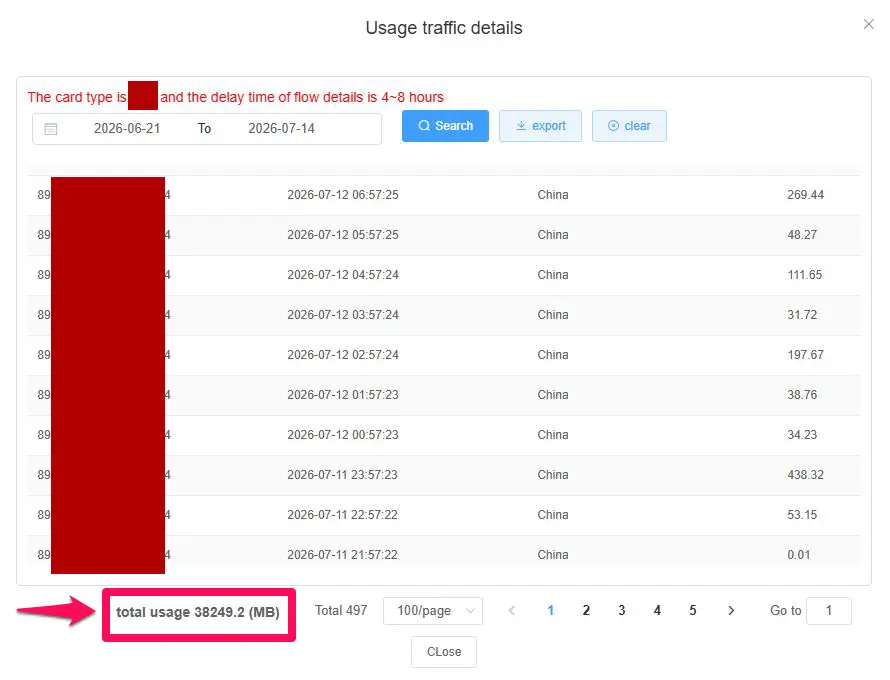
Export times are in UTC (Mainland China is UTC+8). The panel's total (38,249.2 MB) and the sum of the export's 497 rows (38,246.67 MB) differ by about 2.5 MB, i.e. 0.007%: a negligible discrepancy due to export rounding. 1 GB = 1,024 MB.
What this log really tells us
The first thing that stands out is the average: about 1.70 GB per day, almost double a "light" usage pattern of just messaging and maps: it's the typical profile of someone actively using Google, social apps and work tools, not someone who keeps the phone in their pocket. Six days out of twenty-two exceed 2.2 GB, with the peak on July 4 at 2.96 GB, and none of these days caused a slowdown or a block: the network locked on remains China Mobile across all 497 readings, with not a single network change or interruption recorded in the log.
The heaviest hourly reading, 1,159.28 MB in a single hour, dates to July 4 at 17:51 UTC (1:51 a.m. local time in China): a volume consistent with a photo backup, a large app update, or extended streaming, which went through without a hitch right during the overnight window when a VPN under strain tends to get worse instead. Out of 497 total readings, 308 stay under 50 MB (the "background" usage typical of notifications, syncing and messaging) while 62 exceed 200 MB, a sign of active browsing, social or video-call sessions.
If you'll mainly use your phone for Google Maps, messaging and the occasional Instagram photo, the lighter days in the log (0.7-1 GB) are a realistic benchmark. If you expect heavier use — work video calls, ChatGPT, streaming, hotspot for a laptop — the 2-3 GB days show that the network holds up without slowdowns even when usage climbs well above the average. Precisely because there's no Fair Usage Policy kicking in past a certain threshold, there's no need to run predictive GB calculations: what matters is that, day after day, the connection stays stable.
📸 Real screenshots from the traffic management panel
The two images show the "Usage traffic details" panel with the hourly readings recorded for the eSIM (ICCID 89*****************4) and the overall total of 38,249.2 MB across 497 readings, for the period June 21 - July 14, 2026. The panel also notes that traffic details may appear with a delay of 4-8 hours.
📲 Activation: the plan starts when you install the QR code
The moment you install the QR code, the eSIM activates and your usage days start counting immediately, even if you're still at home and haven't arrived in China yet.
If you install it the day before departure or on the day itself, you'll need an internet connection to complete the installation: home Wi-Fi, airport Wi-Fi, or hotel Wi-Fi.
Rule of thumb: install the QR code as close to departure as possible, and when choosing the duration, factor in the installation day too.
It's an easy detail to overlook, but a decisive one for not wasting days of your plan: installing the eSIM "in advance," a few days before your flight, means you start using up the purchased duration before you've even left. It's better to do it on the day of departure, or at most the day before, while you still have home Wi-Fi available. During the flight you can keep your phone in airplane mode and reactivate the connection upon landing.
iPhone / iOS
- 1Purchase and wait for the QR - Choose your plan on the BLIVALE website and complete payment. The QR code arrives by email.
- 2Scan the QR - Go to Settings › Cellular › Add eSIM (or "Add Data Plan") and scan the code. You'll need an internet connection. From this point on, the plan is active.
- 3Set the data line - Assign the BLIVALE eSIM to Cellular Data and keep your home SIM for calls and texts, if you need it.
- 4Land in China - If you were in airplane mode, turn the connection back on and enable data roaming on the eSIM: your phone will lock on to China Mobile.
Android
- 1Purchase and receive the QR - Same process: order online, QR code by email.
- 2Add the eSIM - Go to Settings › Network & Internet › SIMs › Add eSIM and choose "Scan QR code." Menu names vary slightly by brand (Samsung, Pixel, Xiaomi).
- 3Set the eSIM for data - In the dual-SIM settings, select BLIVALE as your data SIM.
- 4In China - Enable data roaming on the eSIM and wait for it to lock on to the local network.
🔗 Hotspot: one connection for multiple devices
The BLIVALE Unlimited Premium and Unlimited Smart eSIMs come with hotspot included, making them well suited to all travelers with multiple devices and to families.
Most of the other eSIMs also support hotspot, however, if you plan to use it intensively, the BLIVALE Unlimited Premium eSIMs are recommended.
For anyone working behind the Great Firewall, hotspot has particular value: it means being able to share with your laptop the very same connection that reaches Google and Gmail without a VPN, instead of having to set up a separate solution just for the computer. It's also useful for couples or families traveling together, with a single eSIM covering multiple phones, and for anyone uploading large photos or videos: as the real log above shows, with hourly readings above one gigabyte, the network handles heavy transfers comfortably too.
📅 How many days to choose, and pricing
The BLIVALE China Unlimited eSIM is available in four durations, all with no contract, no roaming charges and no documents required:
Prices and durations are subject to confirmation at checkout on the product page. All plans include: hotspot (with the limitations noted above), automatic activation on arrival, no Fair Usage Policy, and no ID document required.
Ready to go without worrying about a VPN?
Over 37 GB in 22 days in the real log, always on China Mobile, no VPN and no software restrictions.
🧭 Practical tips before you leave
Download the apps before you go, not after
Even though the connection works without a VPN, some app stores set for the Chinese market no longer distribute Google, Instagram or other Western apps once the region is set to China. The practical rule is simple: download and open at least once Google Maps, Gmail, Instagram, WhatsApp and the ChatGPT app while you're still at home, so they'll already be ready on landing, without having to go through the app store once you're there.
Set up the accounts you'll need
If you use ChatGPT or other services that require SMS verification during sign-up, create the account before departure with your usual phone number. Once in China, the network connection won't be a problem; verifying a brand-new account with a Chinese number, in some cases, might be.
Activate the eSIM at the right time
As explained above, install the QR code on the day of departure, or at most the day before: plan days start counting from installation, not from arrival in China.
Keep your travel documents backed up
Take screenshots of tickets, bookings and addresses, and save them offline in your phone's gallery too. With a stable connection on Google Maps you can still navigate in real time, but a local backup never hurts, especially when moving between different cities.
❓ Frequently asked questions - VPN and eSIM in China
Do I still need to install a VPN in China with the BLIVALE eSIM?
No. The BLIVALE China Unlimited eSIM routes data traffic over international roaming, outside the domestic Chinese network that the Great Firewall acts on. Google, Gmail, Instagram, WhatsApp and most Western services remain reachable without installing or configuring any VPN. A VPN remains an optional choice only for specific needs, not a requirement for everyday use.
Can I use ChatGPT in China with this eSIM?
Yes, network connectivity to the ChatGPT website and app works normally, without the Great Firewall filter. If you still need to create an OpenAI account, we recommend doing it before departure with your usual phone number, since account verification is a separate matter from network connectivity.
Why do some eSIMs for China require a VPN and this one doesn't?
It depends on how data traffic is routed. An eSIM that relies on China's domestic network inherits the same filters as a local SIM and requires a VPN to reach blocked services. The BLIVALE eSIM instead routes data over roaming to the carrier's international infrastructure, leaving the domestic network before it even reaches Google or Instagram.
Does the China eSIM plan start when I install the QR code, or on arrival?
The plan starts the moment you install the QR code. Activation is immediate and usage days start counting from that point, even if you're still in Italy. That's why it's best to install the eSIM as close to departure as possible.
Do I need an internet connection to install the eSIM?
Yes. If you install the eSIM the day before departure or on the day itself, you'll need an internet connection to complete the process, for example home Wi-Fi, airport Wi-Fi, or hotel Wi-Fi. Once installed, the eSIM is already active, so the plan's days are already counting down.
Can I use the China eSIM as a hotspot for a laptop and other phones?
The BLIVALE Unlimited Premium and Unlimited Smart eSIMs come with hotspot included, making them well suited to travelers with multiple devices and to families. Most other eSIMs also support hotspot, but if you plan to use it intensively, the BLIVALE Unlimited Premium eSIMs are recommended.
How much data does someone actually use for Google, Instagram and social apps in China?
It depends on how you use your phone. In the real log of a BLIVALE customer in China, over 22 days about 37.35 GB were used across 497 hourly readings: an average of about 1.70 GB per day, with peak days close to 3 GB and lighter days under 1 GB. Moderate use of maps, messaging and the occasional photo tends to stay closer to the lower end of the log.
Is the China Unlimited eSIM really unlimited, with no FUP?
The BLIVALE product page describes the eSIM as offering unlimited data, no speed limits and no Fair Usage Policy, with an automatic reset of high-speed traffic every 24 hours. Actual speed depends on the coverage and congestion of the local China Mobile network.
Do I have to pay for roaming or sign a contract?
No. BLIVALE's China Unlimited eSIM has no contract and no extra roaming charges. You buy the plan online, receive the QR code by email, and install it on your phone.
Is my smartphone compatible with the eSIM?
Most recent smartphones support eSIM: iPhone from the XS model onward, Google Pixel 3 and later, Samsung Galaxy S20 and later, plus many other recent models. The device must be unlocked, meaning free of carrier SIM lock. Always check compatibility on the product page before purchasing.
What happens when the plan's days run out?
Once the chosen number of days ends, the connection stops. To keep browsing, you purchase a new plan from the China Unlimited eSIM product page.
🏁 Conclusion
The question "which VPN works in China" starts from an assumption that, with the right eSIM, no longer applies: it isn't the VPN that needs to work better, it's the connection that needs to leave the network applying the filter in the first place. The BLIVALE China Unlimited eSIM does exactly that, routing traffic over international roaming on the China Mobile network, and it proves it with a real log of 22 days and over 37 GB used with not a single block or slowdown recorded.
If your trip means staying connected on Google, Instagram, WhatsApp and ChatGPT from day one, without configuring anything and without hoping a VPN server holds up, the simplest technical choice is not having to rely on a VPN at all. Discover the details of the China Unlimited eSIM and arrive already connected.
The next time you're in transit or traveling. There are international connectivity solutions built exactly for travelers and professionals — activatable in 2 minutes, working in over 2,000 countries, with no long-term contracts.